Back to Blog
    Live DemoRoute OptimizationSchool TransportAlgorithmFleet ManagementEmployee Transportation

    How RouteBot Optimizes School & Employee Transport (with Live Demo)

    8/18/2025
    10 min read
    By Emrah G.

    Discover how our advanced route optimization algorithms distribute 1000+ passengers across vehicles in seconds, reducing costs and improving fleet efficiency.

    School and employee transportation has remained largely unchanged for decades. Traditional methods of route planning and passenger distribution often result in inefficient routes, longer travel times, and increased operational costs. Whether it's school bus transportation for students or shuttle services for company staff, planners commonly rely on manual methods – and it's showing its limitations. In fact, as many as 72% of businesses still plan routes manually, leading to wasted time and fuel. But what if we told you there's a better way? Modern AI-powered route optimization is poised to transform how student transportation and personnel transportation fleets operate, making them smarter, faster, and more efficient than ever.

    The Challenge

    Hi to all. I am Emrah G., the founder of RouteBot. I am a software engineer and I have been working in the field of transportation for over 10 years. I have seen the challenges of managing transportation for large schools or companies. Firms that handle school bus fleets or employee shuttles must juggle many variables daily, including changing rider lists and complex city traffic. Some of the key pain points include:

    • Complex Route Planning: Coordinating multiple vehicles across diverse pickup and drop-off points is enormously complex. Planners must consider distance, traffic, school or work start times, and vehicle capacities. With manual planning, routes are often suboptimal – studies show human planners can be 20–40% less efficient at designing complex multi-stop routes compared to algorithms. This inefficiency can mean buses taking longer paths or unnecessary detours, adding miles to the journey and minutes to each passenger's commute.
    • Dynamic Passenger Lists: Both schools and companies deal with daily changes in attendance and schedules. A student might be absent or switch pickup location; an employee may call in sick or work from home on a given day. Traditional plans struggle to adapt to these last-minute changes. Dispatchers often have to scramble with phone calls or ad-hoc reassignments, which can lead to confusion or someone being left without a ride. Ensuring every student transportation or employee transportation request is accommodated on the fly is a major logistical hurdle.
    • Cost Optimization: Fuel, driver hours, and vehicle maintenance all contribute to the bottom line. Inefficient routing means buses travel more miles than necessary or run with many empty seats. This wastes fuel and increases wear-and-tear. It's estimated that manual route planning can waste up to 25% of fuel in transportation operations. For a school district or shuttle operator on a tight budget, these extra costs are significant. The challenge is balancing high-quality service (reasonable ride times, convenient stops) with keeping operational costs in check.
    • Safety and Accountability: Ensuring all passengers are accounted for and transported safely is paramount – especially for school buses carrying children. There's zero tolerance for mistakes like a child getting on the wrong bus or being left behind. Traditional methods rely on driver headcounts or paper checklists, which are prone to human error. During emergencies or delays, lack of real-time information can cause panic for parents or uncertainty for managers. Any modern solution must guarantee near-100% passenger accountability and allow supervisors to know exactly which passenger is on which vehicle at all times.

    These challenges have long been accepted as the "cost of doing business" in school and personnel transport. But with recent advances in technology, we can tackle each of these issues head-on.

    Our Solution: AI-Powered Distribution

    We are very close to show you our Live Demo soon. But let me show you some pre-info about the demo here.

    Live Demo

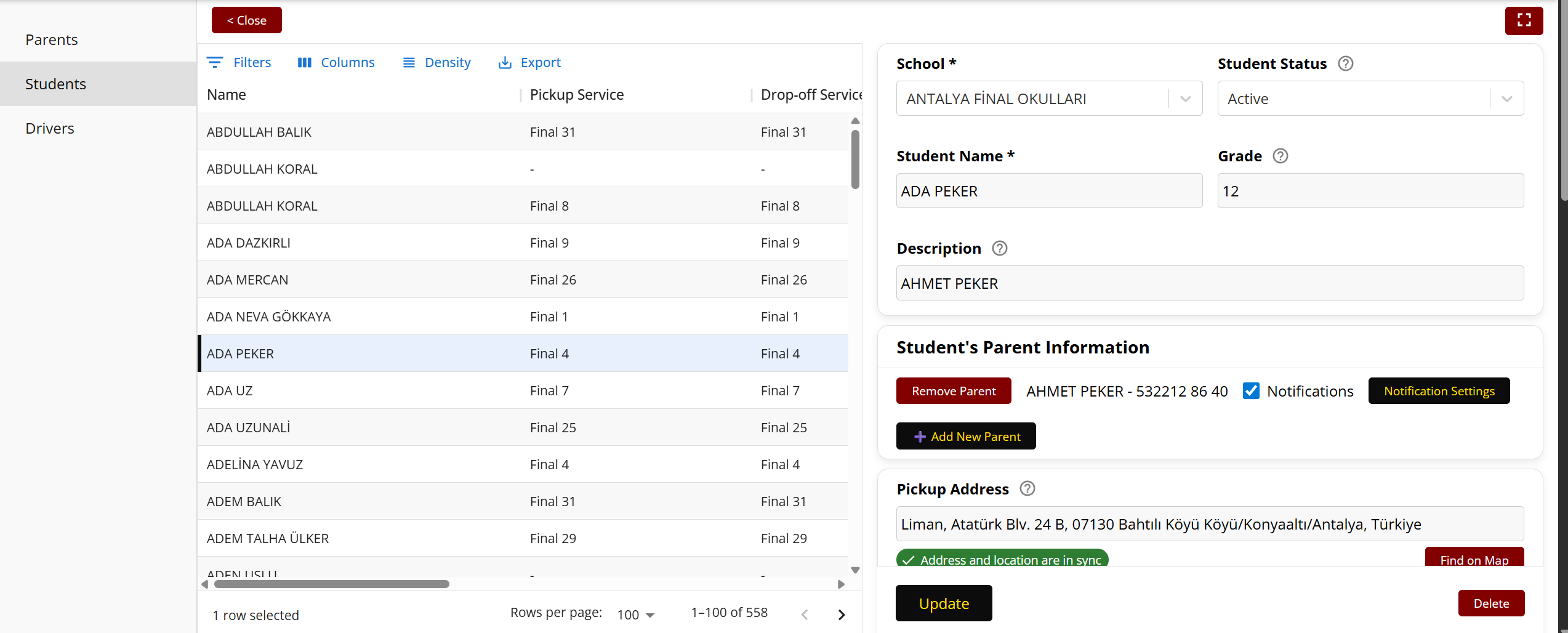
    In our live demo, you can add students to any school and connect them to their parents. So that the parents will be able to track their students while they are on the bus. In the following screenshot, you can see the student list screen in Route Bot. You can use Add New Parent button to add a new parent. Also you can use Notification Settings button to set the notification settings for the parent. Parents can get the notifications via our mobile app. The following notifications are available:

    • Bus is approaching the pickup point
    • Bus arrived at the school
    • Bus left the school
    • Bus is approaching the drop-off point
    • Your student did not get on the bus

    Student list screen in Route Bot

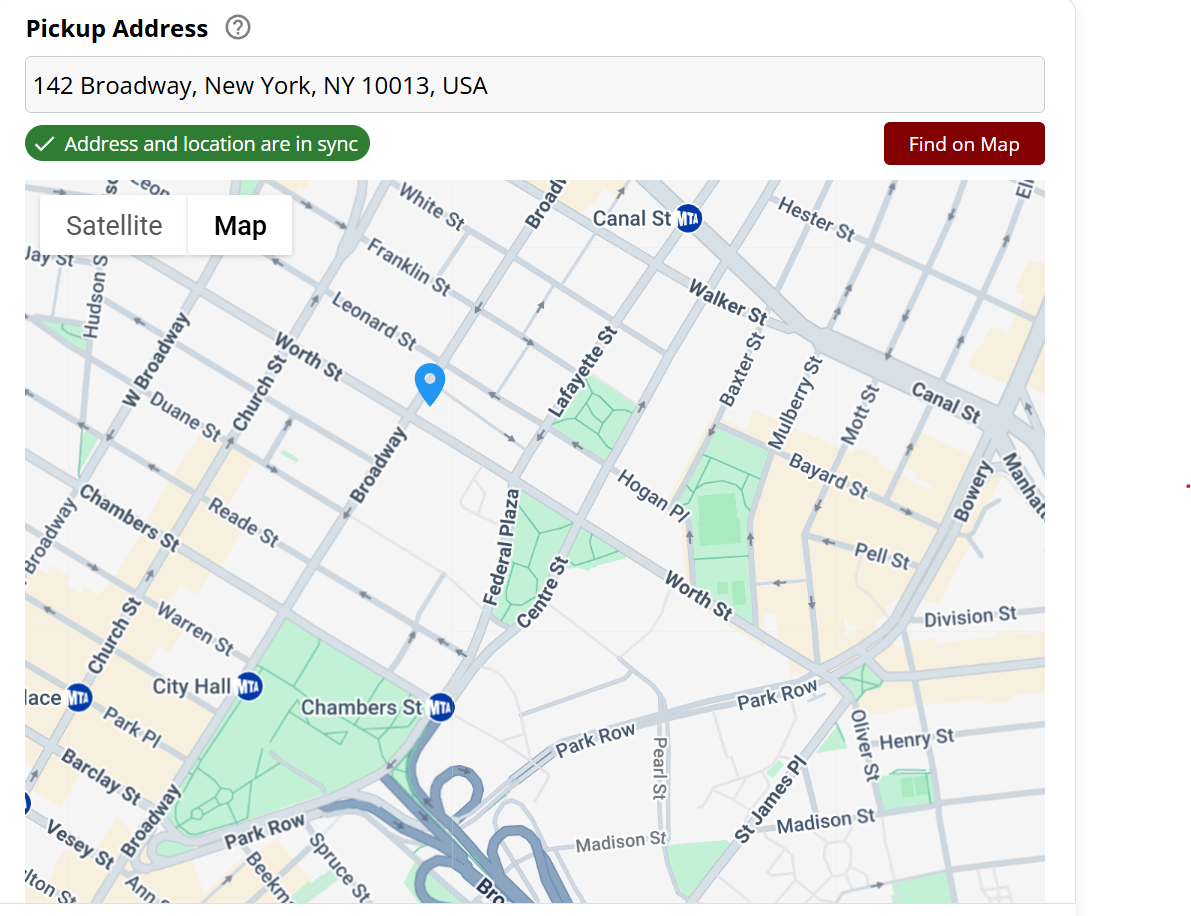
    Additinonally we have a modern way of setting student's address and location on map.

    In the following screenshot, you can see the student's address and location on map. When you change the address, the location on map will be updated automatically. When you change the location on map, the address will be updated automatically. So we have a two way sync between address and location on map which will fasten your process of adding students to the system.

    Address-Location sync in RouteBot

    So these are the first impressions about our app that we create for you.

    Also you can see some technical details about the development process of our app in our dev blog in dev.to here:

    Dev.to blog post about RouteBot

    Instant Distribution

    One of the standout features of RouteBot is its ability to process huge amounts of data and output an optimal routing plan in seconds. Imagine a school district or company shuttle service needing to assign over 1,000 passengers to dozens of vehicles each morning. Doing this by hand could take hours of painstaking work with maps and spreadsheets – and still not be truly optimal. RouteBot performs instant distribution by crunching the numbers in moments. It considers every student or employee's pickup point and destination, the available buses, and the constraints (like timing and capacity) to optimally distribute all passengers across the fleet in mere seconds, not hours.

    How is this possible? Under the hood, RouteBot's AI is solving a variant of the well-known vehicle routing problem (VRP) using clever heuristics and machine learning. It evaluates countless route combinations at lightning speed, something a human dispatcher simply can't do in a reasonable time. The result is a set of routes that minimize total travel time and distance while respecting all constraints. For transport managers, this means each morning they can input the day's passenger list and trust the system to assign riders to the right bus and route instantly. No more manual trial-and-error. The time savings in planning alone are enormous, freeing staff to focus on oversight and quality instead of route calculations.

    Shortest Path Calculation

    Speed is nothing without efficiency. RouteBot doesn't just assign passengers to random buses quickly – it finds the most efficient route for each vehicle. Our algorithms calculate the optimal paths by taking into account a multitude of real-world factors, including:

    Our algorithms calculate the most efficient routes considering:

    • Traffic patterns: Using historical and real-time traffic data, the system avoids known congestion hotspots. If certain streets are always jammed at 8 AM or there's an accident reported en route, the AI will reroute vehicles to avoid delays. This dynamic traffic awareness ensures travel time is kept to a minimum.
    • Geographic Proximity: The algorithm smartly clusters pickups that are geographically close into the same route. For example, students or employees living in the same neighborhood or along a logical corridor will be grouped to ride together, rather than inefficiently crisscrossing town. This reduces zig-zagging and backtracking, cutting down total mileage.
    • Vehicle Capacity Utilization: Each bus or shuttle has a limited number of seats. RouteBot fills vehicles optimally without overloading or leaving too many empty seats. It will assign just the right number of passengers to each vehicle so that you maximize utilization while everyone rides comfortably. Optimized loading means fewer vehicles might be needed to serve the same number of people, directly reducing fleet operational costs (fewer drivers, less fuel). For instance, if one route can be served by a single bus instead of two smaller vans, the system will identify that consolidation.
    • Time Windows and Constraints: In school transport, the morning bell time or afternoon dismissal sets hard deadlines; in corporate transport, work start times do the same. Our solution respects these time windows, as well as individual constraints like maximum ride time for each passenger (important in student transport to prevent children from being on the bus too long). The algorithm finds the shortest path that meets all timing requirements, ensuring every rider arrives on schedule. By aligning routes with tight schedules, many users see a dramatic improvement in punctuality – companies using AI routing achieve over 90% on-time performance on their routes, compared to around 70–80% with manual planning.

    The result of these shortest-path calculations is a set of optimized routes that cut out unnecessary mileage. Buses travel fewer kilometers and complete their circuits faster. This not only saves time but also translates to lower fuel consumption. In logistics, AI-optimized routes have been shown to deliver fuel savings on the order of 10–20% on average, and in some transportation cases even more. For example, UPS's famous ORION routing system (which is a form of AI route optimization) reportedly saved them 10 million gallons of fuel by minimizing routes. While school and staff shuttle routes are different from parcel delivery, the core principle is the same – less distance and fewer idle minutes mean real savings in fuel and time.

    Real-Time Adaptability

    A route plan that's optimal at 7:00 AM can become suboptimal by 7:30 AM due to unforeseen events. That's why real-time adaptability is a cornerstone of RouteBot. The system doesn't just create a static plan and leave it at that; it actively monitors and adapts to changes as they happen, ensuring smooth operations throughout the day. Here's how it works:

    • Last-Minute Changes: If there are last-minute passenger additions or cancellations (which are common – e.g., a parent calls to say they will drive their child today, or an employee unexpectedly needs a ride), RouteBot can re-optimize the affected routes instantly. Instead of causing a domino effect of confusion or requiring manual calls, the system will automatically adjust – perhaps assigning a different bus to a new student or rerouting a shuttle to skip a canceled pickup – and communicate the change to drivers and admins.
    • Vehicle Breakdowns or Delays: If a bus has a mechanical issue or a driver is running late, the AI can redistribute that vehicle's passengers to other nearby vehicles or send a replacement, and recalculate new routes on the fly. The ability to react within seconds minimizes disruptions. For example, if Bus A was supposed to pick up 20 students but gets a flat tire, the system can quickly instruct nearby Bus B and C to divide those pickups between them, adjusting their paths. Passengers still get to school or work on time, and no one is left stranded.
    • Dynamic Traffic and Road Conditions: RouteBot continuously ingests real-time data on traffic congestion, accidents, and road closures. If a major delay pops up on the planned route (say an accident causes a road to close), the system will automatically reroute the bus along a faster alternative path. This dynamic rerouting is done within seconds and can be communicated to the driver via a mobile app or onboard device. The days of buses stuck waiting in traffic jams without guidance are over – the AI is effectively providing a navigation assistant that always seeks the quickest path available at the moment. Drivers using such intelligent guidance can simply follow the updated directions, confident that it's the best route.

    By adapting in real time, RouteBot ensures that even when unexpected events occur (and they inevitably do), the transportation service remains reliable. This adaptability greatly improves the experience for riders – parents and employees can trust that despite chaos on the roads or sudden changes, their transport will adjust and still deliver on time. It's like having a dedicated traffic control center and expert dispatcher working 24/7 for your fleet. In the words of one school administrator, AI-based systems "reduced delays and ensured timely pick-ups and drop-offs" thanks to route optimization. In short, the plan is never out of date – RouteBot is always recalculating to stay optimal.

    The Impact

    The shift to AI-powered route optimization isn't just a tech upgrade; it produces tangible benefits for school districts, transport companies, and of course the passengers. Early adopters of RouteBot and similar smart routing systems have reported impressive improvements in key performance metrics. Here are some of the outcomes observed:

    • 40% Reduction in Total Travel Time: By eliminating circuitous routes and unnecessary stops, total time spent on the road per route plummets. Passengers get to their destinations significantly faster. In one real-world case, a school that optimized its bus routing saw route travel times drop by nearly half. Even more moderate scenarios report travel time reductions on the order of 25–35%, meaning students and employees spend less time commuting and more time being productive at school or work (or simply at home longer in the morning).
    • Up to 30% Decrease in Fuel Costs: Fewer miles and optimized driving speeds translate directly into fuel savings. For fleets, fuel is one of the biggest expenses, and cutting it by a quarter or more has a huge budget impact. Case studies have shown schools saving around 20% in fuel costs after implementing AI route planning, , and logistics companies often cite 10–20% fuel reductions. RouteBot's efficient routing and reduced idle times can realistically trim fuel bills by as much as 30% in operations that had a lot of inefficiencies. This also means a greener footprint – lower fuel use leads to lower carbon emissions, a win for environmental responsibility.
    • Improved On-Time Performance (95%+): Punctuality skyrockets with intelligent routing. Buses that used to arrive unpredictably late are now consistently on schedule. Many RouteBot-equipped services achieve on-time performance in the 95% range or above, whereas previously they might have been hitting only 70–80% on-time deliveries of students or staff. One school district reported a 35% improvement in on-time arrivals after adopting an AI routing system. This kind of reliability is priceless for building trust – parents know their kids will be at school before the bell, and managers know employees will arrive at the office as scheduled.
    • 100% Passenger Accountability: With integrated tracking and smarter assignment, every single passenger is accounted for every trip. No more scenarios of a child boarding the wrong bus or a headcount mistake going unnoticed. Technologies like RFID check-ins or mobile app confirmations (which RouteBot supports) ensure student and employee accountability. For instance, systems can automatically record when a passenger boards or leaves the bus and alert staff if someone who is supposed to be on board is missing. This leads to complete peace of mind – schools can confidently say all students are safe and accounted for, and companies know exactly which employees are on the shuttle at any time. In transportation, knowledge is safety.
    • Cost Savings and Efficiency Gains: Beyond fuel, other operational costs drop too. Optimized routes mean you might be able to cover all required trips with fewer vehicles or fewer driver hours. Maintenance costs also go down because vehicles are driving less and avoiding harsh stop-and-go patterns. Some schools have seen a 25% reduction in overall transportation costs after streamlining their routes. Companies report total transportation cost reductions in the range of 15–25% when using AI route optimization, thanks to efficiencies in fuel, labor, and asset utilization. These savings can then be reinvested into other priorities, whether it's educational resources for schools or core business needs for companies.
    • Enhanced Satisfaction for Stakeholders: When buses are on time and rides are shorter, everyone is happier. Parents experience less anxiety and fewer "Where's the bus?" moments because they can trust the optimized system (often paired with real-time tracking apps for visibility). In a school that adopted our solution, parent satisfaction rose markedly, with surveys showing a 40% improvement in positive feedback regarding transportation after implementation. For companies, employees appreciate a reliable commute – it reduces stress and even tardiness at work. Drivers also benefit: with clearly optimized routes and less idle time in traffic, their work becomes easier and more predictable, often leading to improved morale.

    These impacts underscore that AI route optimization isn't just about doing things a little better – it's a step change in efficiency and service quality. When a routing algorithm can do in seconds what used to occupy a team of planners for hours, and do it more effectively, the ripple effects are significant. Schools report getting students home earlier in the afternoons, and businesses notice employees arriving to work in a better mood due to smoother commutes. It's truly a revolution in school and personnel transport. As one transportation director noted, "AI-driven route optimization reduced delays and ensured timely pick-ups and drop-offs" – a simple statement that translates to big wins in practice.

    Beyond Schools: Optimizing Employee Transportation

    While our examples often reference school buses, it's worth highlighting that the same AI routing technology is equally transformative for corporate and personnel transportation services. Companies that provide shuttle buses for their employees face similar logistical puzzles: multiple pickup points across a city, shifting schedules (especially with flexible work hours or split shifts), and a mandate to get everyone to work on time efficiently. RouteBot's features are just as beneficial in this arena:

    For instance, a large tech campus running morning and evening shuttle routes for hundreds of employees can use AI optimization to shorten ride times and reduce how many buses they need. Employees living in the same apartment complex or neighborhood can be grouped onto one van that takes the fastest route, rather than each taking individual cars or a poorly planned single-route bus that meanders. By optimizing these employee transportation routes, companies not only save on transport costs but also boost productivity – employees arrive on time and less fatigued. In one case study of an employee shuttle service in Turkey, implementing an optimized routing model achieved a striking 47% reduction in total travel time for the staff commutes. This meant employees spent significantly less time in transit each day, which is a direct gain in work-life balance and morale.

    Moreover, corporate shuttle operations benefit from RouteBot's real-time adaptability in unique ways. If an employee misses their usual shuttle or has to stay late, the system can adjust by scheduling a later pickup or rerouting another vehicle to collect them. For daily shifts, the software can automatically account for different work start times or multiple office locations, ensuring each route is tailored to that day's demand. The result is a more flexible and responsive transportation program that can serve employees better than any static timetable could.

    From the operations perspective, the ROI for businesses is compelling. By cutting out redundant routes and optimizing loads, some companies manage to trim their fleet size or at least avoid expanding it as their headcount grows. One facilities manager shared that after adopting AI routing, they could handle a growing workforce without adding new buses, simply by using the existing fleet more efficiently. And like school districts, corporations see fuel and maintenance expenses drop. Over a year, these savings can be substantial for the company's bottom line.

    In short, route optimization isn't just for school buses – it's a universal solution for any organization that transports people. Be it student transportation or employee shuttles, the algorithms work the same magic: shorter, smarter routes and a smoother experience for all riders.

    Implementation and Integration Considerations

    Adopting an AI-powered routing solution like RouteBot does require some changes to current operations, but our team has made the transition as seamless as possible. As experts in the field (and knowing what concerns a school or transport manager might have), we address implementation in a few key ways:

    • Ease of Integration: We designed RouteBot to integrate with existing systems and workflows. For schools, that means it can tie into student information systems or existing transportation management software. For companies, it can import employee roster data or interface with corporate scheduling tools. Rather than disrupting everything, the AI routing engine works alongside your current processes. For example, if your dispatchers currently use a certain platform, RouteBot can output routes into that platform's format, or drivers can use our dedicated app – whichever fits best. This reduces the learning curve and avoids a jarring overhaul of your tech stack.

    • Training and Support: We understand that implementing a new system can be daunting, especially for staff used to traditional methods. That's why the rollout of RouteBot includes comprehensive training and ongoing support. We conduct training sessions for dispatchers, administrators, and drivers so everyone knows how to use the new tools, interpret the routes, and respond to real-time updates. The software's interface is user-friendly and designed with non-technical users in mind, often requiring just a few clicks to get results. During the initial days of use, our support team is on hand to answer questions and fine-tune settings. This hand-holding ensures a smooth transition with minimal frustration.

    • Data Security and Privacy: Especially in student transportation, data security is paramount – we're dealing with children's personal information and location data. RouteBot employs robust encryption and adheres strictly to data protection regulations to safeguard all sensitive information. Access controls are in place so that only authorized personnel can see route details or passenger info. We also undergo regular security audits. Schools and companies can be confident that while the AI is crunching data about riders and routes, that data is well-protected and used solely for routing purposes.

    • Cost of Implementation: Budget is always a concern. There is an upfront cost to deploying a sophisticated system like RouteBot (software licenses, possibly new GPS devices or tablets for buses, etc.). We help clients analyze the long-term savings to ensure the investment is worthwhile. In most cases, the operational savings from route optimization – through reduced fuel usage, fewer extra routes, and improved efficiency – quickly offset the initial costs. For example, if a school district spends tens of thousands on fuel monthly, even a 15% reduction provides huge savings over a year, often paying back the software investment. Additionally, by improving fleet utilization, some clients avoid having to purchase additional vehicles, which is a major capital savings. We can work with limited budgets by phasing the implementation (perhaps starting with morning routes only or a subset of buses as a pilot) to prove the value before scaling up.

    By proactively addressing these areas, we ensure that adopting RouteBot is not a painful overhaul but rather a welcome upgrade. Change management is a big part of success – and we emphasize communication with all stakeholders (school principals, parents, drivers, corporate HR, etc.) to get everyone on board with the new system. Once they see the improvements in action – shorter routes, clear digital manifests, real-time tracking – any initial resistance fades away quickly.

    See RouteBot in Action

    Reading about it is one thing – but the real value is in experiencing it yourself.
    With our interactive demo, you can explore how RouteBot handles real-time passenger distribution and AI-powered route optimization in seconds.

    👉 Check out our live demo

    During the demo, you'll see:

    • Over 1,000 passengers optimally assigned to vehicles within seconds
    • Dynamic routes that update instantly with live traffic conditions
    • Simulation of how schools and companies reduce operational costs with smarter routing

    Numbers and promises are compelling, but nothing beats seeing RouteBot in action and understanding the difference it can make for your operation.

    Looking Forward

    The future of school and employee transportation is here, and it's smarter than ever. But we're not stopping at the current capabilities. As we continue to innovate, we're exploring exciting developments that will further enhance route optimization and fleet management:

    • Smart City Integration: Urban areas are getting "smarter," with city infrastructure providing data that can benefit transportation. We envision RouteBot integrating with smart city systems – for example, connecting with traffic light networks to get priority signaling for school buses, or using citywide traffic API feeds for even more granular real-time routing. Additionally, integration with public transit data could allow school and corporate shuttles to complement municipal transport (e.g., adjusting routes to pick up from train stations when delays occur). By syncing with the broader transportation ecosystem, our solution can create a more harmonized commute for everyone and reduce congestion. In Boston, a smart routing initiative for school buses (combined with adjusting school start times) led to $5 million in yearly savings for the district – highlighting how impactful data-driven route planning can be when done at scale.

    • Predictive Maintenance: Route optimization doesn't only apply to mapping paths – it can optimize vehicle usage and upkeep as well. We're integrating predictive analytics that monitor each vehicle's performance and usage patterns to foresee maintenance needs. For instance, if a certain bus is doing more mileage or exhibiting signs of engine strain, the system will flag it for a check-up before a breakdown occurs.By predicting maintenance, schools and companies can prevent unexpected breakdowns that disrupt service. It also means safer vehicles on the road. AI can analyze metrics like engine hours, braking frequency, or sensor data (oil levels, tire pressure via IoT sensors) to recommend the optimal time for servicing each bus. This leads to a more reliable fleet with less downtime and extends the lifespan of vehicles through timely care.

    • Advanced Analytics and Continuous Optimization: The data collected by RouteBot can be a goldmine for improving operations. We are working on enhanced analytics dashboards that give transportation managers deep insights. This includes reports on route efficiency, stop utilization (e.g., which pickup points have low usage and might be consolidated), average ride times, and even comparisons of planned vs. actual route performance. By analyzing these trends, the system can continuously refine its algorithms. For example, if it learns that on Wednesdays there's always heavier traffic near a particular office park, it can start adjusting Wednesday routes differently than other days. Analytics also help administrators justify decisions – you can show with data how optimization is saving money or improving service, which is valuable for school boards or company leadership. This data-driven approach ensures that the longer you use the system, the more tailored and efficient it becomes for your specific network.

    • Towards Autonomy: Looking further ahead, the rise of autonomous vehicles could intersect with route optimization. While fully self-driving school buses or shuttles are not commonplace yet, they are being tested. RouteBot's technology is well-positioned to guide autonomous vehicles, since an AI-driven bus would still need the smartest route to follow. In a future scenario, an autonomous school bus might receive an optimized route from our system and follow it precisely, communicating back any anomalies it senses on the road. Even partial autonomy – like driver assistance systems – can benefit from optimized routing to reduce driver stress. Autonomous or not, vehicles that stick to efficient routes will save time and energy. We are excited about a future where perhaps dispatchers just supervise an AI fleet that largely runs itself, safely and punctually transporting everyone.

    In conclusion, the adoption of AI-powered route optimization is revolutionizing school and personnel transport. What was once a tedious daily challenge is now an automated, intelligent process. By tackling the complexities of route planning, adapting on the fly, and continually learning, systems like RouteBot are delivering safer, faster, and cheaper transportation for students and employees alike. The success stories – from schools cutting costs and improving on-time rates, to companies nearly halving commute times for their staff – speak for themselves. And with ongoing innovation, the gap between traditional transportation and AI-optimized transportation will only widen.

    The future of school and employee transportation is not just about moving people from point A to B – it's about doing so efficiently, reliably, and intelligently. That future is here today with AI-powered route optimization, and it's driving us all toward a smarter commute. The road ahead has never looked more promising.

    Ready to Transform Your Transport System?

    Be among the first schools to experience the future of transportation management with RouteBot's innovative solutions.

    Get Started Today