How to Sign Up for RouteBot Mobile App: Complete Guide
Learn how to create your RouteBot account and get started with our mobile application. Important: SMS notifications are required for login and shuttle updates.
Getting started with RouteBot's mobile application is quick and easy. Our app provides real-time tracking, notifications, and seamless communication for school transportation and employee shuttles. Here's everything you need to know about signing up and what to expect.
Download the RouteBot App
For iOS Users
- Open the App Store on your iPhone or iPad
- Search for "RouteBot"
- Tap "Get" to download and install the app
- The app is free to download and use
For Android Users
- Open Google Play Store on your Android device
- Search for "RouteBot"
- Tap "Install" to download and install the app
- The app is free to download and use
Creating Your Account
Step 1: Launch the App
Once installed, tap the RouteBot icon to open the application.
Step 2: Start Registration
- Tap "Sign Up" or "Create Account" on the welcome screen
- You'll be prompted to enter your basic information
Step 3: Required Information
You'll need to provide:
- Full Name: Your complete name as it appears on official documents
- Email Address: A valid email for account verification and important updates
- Phone Number: Your mobile number for SMS notifications and login verification
- Password: Create a strong password for account security
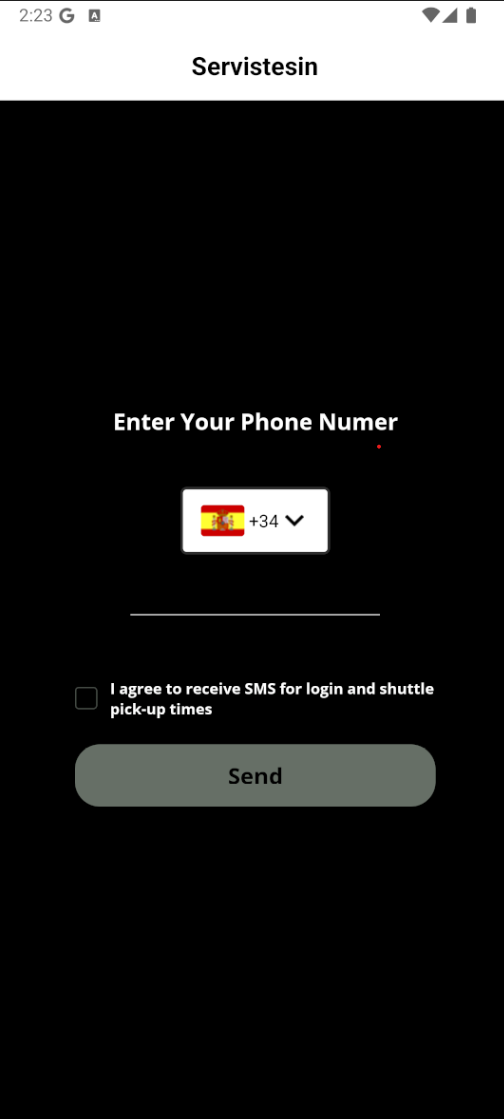
Step 4: SMS Agreement (Required)
Important: Before you can complete your registration, you must agree to receive SMS messages. This is a mandatory requirement for all RouteBot users.
You'll see a checkbox with the following text:
"I agree to receive SMS messages for login verification and shuttle pick-up time notifications"
You cannot complete the signup process without checking this agreement box.
Why SMS Notifications Are Required
SMS notifications are essential for RouteBot's core functionality:
Login Security
- Two-factor authentication via SMS for enhanced account security
- Login verification codes sent directly to your phone
- Protection against unauthorized access to your account
Shuttle Updates
- Real-time pickup time notifications
- Route changes and delays
- Emergency alerts and important updates
- Arrival confirmations
Communication
- Direct communication from your school or employer
- Important transportation announcements
- Service updates and maintenance notifications
Managing Your SMS Preferences
In-App Settings
You can manage your SMS preferences at any time:
- Open the RouteBot app
- Go to "Settings" (usually in the profile or menu section)
- Select "Notification Preferences"
- Toggle SMS notifications on or off as needed
Opt-Out Options
If you need to opt out of SMS notifications, you have two options:
Option 1: App Settings
- Use the in-app notification settings to disable SMS messages
- You can re-enable them anytime through the same settings
Option 2: Phone Support
- Call our support line: +1 (332) 249-2999
- Our support team can help you modify your notification preferences
- Available during business hours for immediate assistance
Account Verification
Email Verification
After completing registration:
- Check your email inbox for a verification message from RouteBot
- Click the verification link in the email
- Your email will be confirmed and your account activated
Phone Verification
- You'll receive an SMS with a verification code
- Enter the code in the app when prompted
- Your phone number will be verified for SMS notifications
Getting Started with RouteBot
First Login
- Use your email and password to log in
- Complete any additional setup prompts
- Grant necessary permissions (location, notifications)
Connecting to Your Organization
- If you're a student or employee, you may need an organization code
- Contact your school or employer for the specific code
- Enter the code when prompted during setup
Setting Up Notifications
- Choose your preferred notification types
- Set quiet hours if desired
- Customize alert sounds and vibration patterns
Troubleshooting Common Issues
Can't Receive SMS Messages
- Ensure your phone has a strong cellular signal
- Check that your phone number is entered correctly
- Verify your carrier supports SMS delivery
- Contact support if issues persist
App Won't Load
- Check your internet connection
- Restart the app
- Update to the latest version from the app store
- Clear app cache if problems continue
Forgot Password
- Use the "Forgot Password" link on the login screen
- Enter your email address
- Check your email for password reset instructions
Privacy and Security
Data Protection
- All personal information is encrypted and secure
- We comply with GDPR, COPPA, and other privacy regulations
- Your data is never shared with third parties without consent
SMS Privacy
- SMS messages are sent only for essential notifications
- No marketing messages or spam
- You control what types of notifications you receive
Support and Help
In-App Help
- Access the help section within the app
- Browse frequently asked questions
- Contact support directly through the app
Phone Support
- Call +1 (332) 249-2999 for immediate assistance
- Available during business hours
- Can help with account issues, SMS preferences, and technical problems
Email Support
- Send questions to our support team through the app
- Response time is typically within 24 hours
- Include your account email for faster assistance
Next Steps
Once you've successfully created your account:
- Explore the App: Familiarize yourself with the interface and features
- Set Preferences: Customize your notification settings to your liking
- Connect: Link your account to your school or employer if applicable
- Stay Informed: Keep the app updated for the latest features and improvements
Important Reminders
- SMS Agreement is Mandatory: You cannot use RouteBot without agreeing to SMS notifications
- Keep Your Phone Number Updated: Notify us if you change your phone number
- Stay Connected: SMS notifications ensure you never miss important updates
- Opt-Out Anytime: You can change your SMS preferences or call +1 (332) 249-2999 to opt out
RouteBot is designed to make transportation safer, more efficient, and more transparent. By signing up and agreeing to SMS notifications, you're taking the first step toward a better transportation experience.
Ready to get started? Download the RouteBot app today and join thousands of users who are already enjoying smarter transportation management.