School Bus Routing Software (2026)
Reduce fleet size by 20–40% using real route optimization. Generate routes for hundreds of students in under a minute.
Most school bus routing software shows you a pretty map and calls it "optimization." The actual problem is harder than that: you have hundreds of students, dozens of constraints nobody writes down, and a planning window measured in days, not months. Real routing software doesn't just visualize your routes — it rebuilds them from scratch, mathematically, and finds combinations your planner can't reach by hand.
- Reduce the number of buses and total mileage across your fleet
- Generate optimal routes in minutes instead of weeks of manual planning
- Handle real constraints — time windows, vehicle capacity, stop limits, SPED requirements, bell times
Best School Bus Routing Software (2026)
If you're evaluating school bus routing software right now, the field is smaller than you'd think. Plenty of vendors have a map and a logo. Fewer have an actual optimizer behind the interface. Here's what the landscape looks like based on what we've seen working with schools and what transportation directors tell us after trying other tools.
| Software | Core Strength | Where It Falls Short |
|---|---|---|
| RouteBot | Real-time VRP optimization, flexible constraints, handles schools + corporate shuttles, fast setup, Excel import | Newer to market |
| Optibus | Enterprise-grade transit planning, strong in public transit | Heavy enterprise focus, complex onboarding, overkill for most school districts |
| Transfinder | Established name in school routing, large install base | Legacy architecture, slower to innovate, less flexible constraint handling |
The difference that matters most isn't the interface — it's what happens when you click "Optimize." Some tools run a basic nearest-neighbor algorithm: assign each student to the closest bus, sequence stops by proximity, done. That gives you a plan, but not a good one. Real optimization means the system evaluates thousands of possible assignments and sequences, balances fleet utilization, respects hard constraints, and minimizes total distance simultaneously. That's the gap between a routing product and actual school bus routing software.
We built RouteBot because the tools we evaluated were either over-engineered for city transit (not school operations), or too basic to deliver measurable savings. If you're comparing options, the simplest test is this: load the same roster into two products and compare how many buses each one needs. The math doesn't lie.
Somewhere right now a transportation coordinator is staring at a wall of sticky notes, trying to figure out which bus covers the new apartment complex that opened last month. She's been at this for three hours. The phone rings every fifteen minutes. Two drivers called in sick. And the school year starts in nine days.
That's the job routing software is supposed to fix. Not "make easier" in a vague, marketing-slide way. Actually fix: take the roster, the buses, the bell times, and the hundred other constraints nobody writes down, and produce a set of routes that won't fall apart on the first morning.
But does it? When is it worth the switch? And what does the difference actually look like day to day?
What changes when you stop doing routes by hand
Let's be direct about what manual routing costs you, because the problem isn't that your planner is bad at the job. It's that the job outgrows any person past a certain scale.
A planner with 15 routes and a stable roster can do fine with a spreadsheet and local knowledge. She knows the railroad crossing that backs up at 7:15, which neighborhood has the tricky cul-de-sacs, and that Bus 12's driver refuses to turn left on Oak Street. That knowledge is valuable and no software replaces it.
But at 35, 50, 80 routes? The math changes. Not metaphorically. Literally. Every stop you add multiplies the number of possible sequences. A route with 15 stops has more possible orderings than there are people on Earth. Your planner isn't evaluating those. She's picking one that looks reasonable and moving on, because there's no time for anything else.
That's where the waste hides:
Seats that ride empty. When routes are built by feel, some buses run at 90% capacity and others at 40%. You're paying for both. Fuel, driver hours, maintenance — the bus doesn't know it's half-empty.
Miles that don't need to exist. A human groups stops by what looks close on a map. Software considers actual road distances, turn penalties, and one-way streets. The gap between "looks close" and "actually close by road" adds up across 50 routes.
Time you spend replanning. A new subdivision opens in February. Twenty students transfer schools in October. Each change means hours of rework. With software, it's a data update and a re-run.
Inconsistency. Your senior planner retires. The new person builds different routes for the same inputs. Quality becomes person-dependent.
None of this is hypothetical. In one K-8 school we onboarded, the average route duration before optimization was 38 minutes. After the system redistributed students across buses using actual road distances instead of eyeballed proximity, that dropped to 26 minutes. Same students, same school, same bell time — just a better assignment. Twelve minutes per route, multiplied across the fleet, adds up to real hours and real fuel.
Here's what that looked like across key metrics:
| Metric | Before RouteBot | After RouteBot |
|---|---|---|
| Average route duration | 38 min | 26 min |
| Number of buses | 22 | 22 |
| Annual route planning time | ~3 weeks | <2 days (address verification) |
| Distribution + driver/parent notification | Manual (hours) | <10 minutes |
Industry-wide, districts that measure before and after typically see 15–30% fewer buses needed and 10–20% less total mileage. The range is wide because it depends on how loose the manual baseline was. We dug into this comparison in detail in manual vs. algorithmic route planning.
Want to see the difference for your district? Try RouteBot with sample data — load students, set constraints, run the optimizer. No signup, no sales call. Or see how much you can reduce fleet size with your own roster.
How school bus routing software works — a quick example
Take a suburban district with 120 students. The transportation coordinator inherited 8 buses — routes layered on over years, a bus added here when a neighborhood grew, another there when a driver complained about her run being too long. Some of those buses carry 40 kids. Others ride around with 15. Nobody's rebalanced because nobody has the time.
You feed the 120 addresses into the system, set bus capacity at 45, and tell it the school bell rings at 8:00 AM. The optimizer clusters students, assigns them to the fewest buses that can serve everyone within the time window, and sequences the stops so each route covers the least possible distance.
What comes back: 6 buses instead of 8. Total route mileage down about 25%. Every student still arrives on time. Two fewer buses means two fewer drivers on payroll, two fewer fuel bills, two fewer insurance policies.
That gap — 8 buses to 6 — is typical. Denser areas see bigger fleet reductions; rural districts see more mileage savings. The mechanism is the same either way: the software searches through combinations a human can't, and finds the assignment your planner would have built if she had infinite time and a perfect memory.
The video further down shows this happening live with 500 students in RouteBot.
So what does routing software actually do?
It takes your inputs — student addresses, bus capacities, bell times, equipment requirements, policy rules — and searches through combinations until it finds route plans that are hard (often impossible) for a person to find by hand. Fewer buses, shorter routes, balanced loads, everyone picked up on time.
The software isn't thinking. It's searching. Very fast, very systematically, through a space of options too large for a human to cover. That's the whole trick.
It won't make policy decisions for you. Walk distance limits, which corners are safe for stops, whether to grandfather a route because the driver and the families know each other — that's judgment, and it stays with your team. The best setups treat routing software as a first-draft machine: it produces a plan, your people review and adjust.
For a deeper look at how the algorithms actually work — the VRP framework, constraint types, heuristics — we wrote a separate technical piece: Technical Analysis of School Bus Routing Software.
See it in action. Try the live demo with sample data and run an optimization yourself. Takes two minutes, no signup needed.
Watching it happen: 500 students distributed in RouteBot
Theory is one thing. Here's what it looks like when you actually press the button.
In the demo below, we load 500 students into RouteBot and let the system distribute them. Five hundred because it's large enough that nobody's solving it with a highlighter. You'll see:
- Students assigned to buses automatically, balanced by capacity and proximity
- Pickup times calculated stop by stop for each route
- The number of buses minimized — the system figures out the fewest vehicles that can cover everyone within constraints
- Total distance per route kept as short as the stops allow
The two things it's optimizing simultaneously — fewer buses and shorter distance per route — are exactly the tradeoff transportation directors wrestle with every year. The software just evaluates thousands of options in the time it takes you to read this paragraph.
That's sample data, sped up. In a live setup the same roster would also pull in bell times, vehicle types, SPED requirements, and whatever other rules your district needs. You set the maximum number of students per bus (the system enforces it as a hard cap during clustering), and the optimizer figures out how many buses that implies and how to sequence the stops. The planner reviews the output, flags exceptions, adjusts if needed, and pushes to production. Once approved, drivers get the routes on their mobile app and parents receive pickup details — vehicle assignment, stop location, estimated time — automatically.
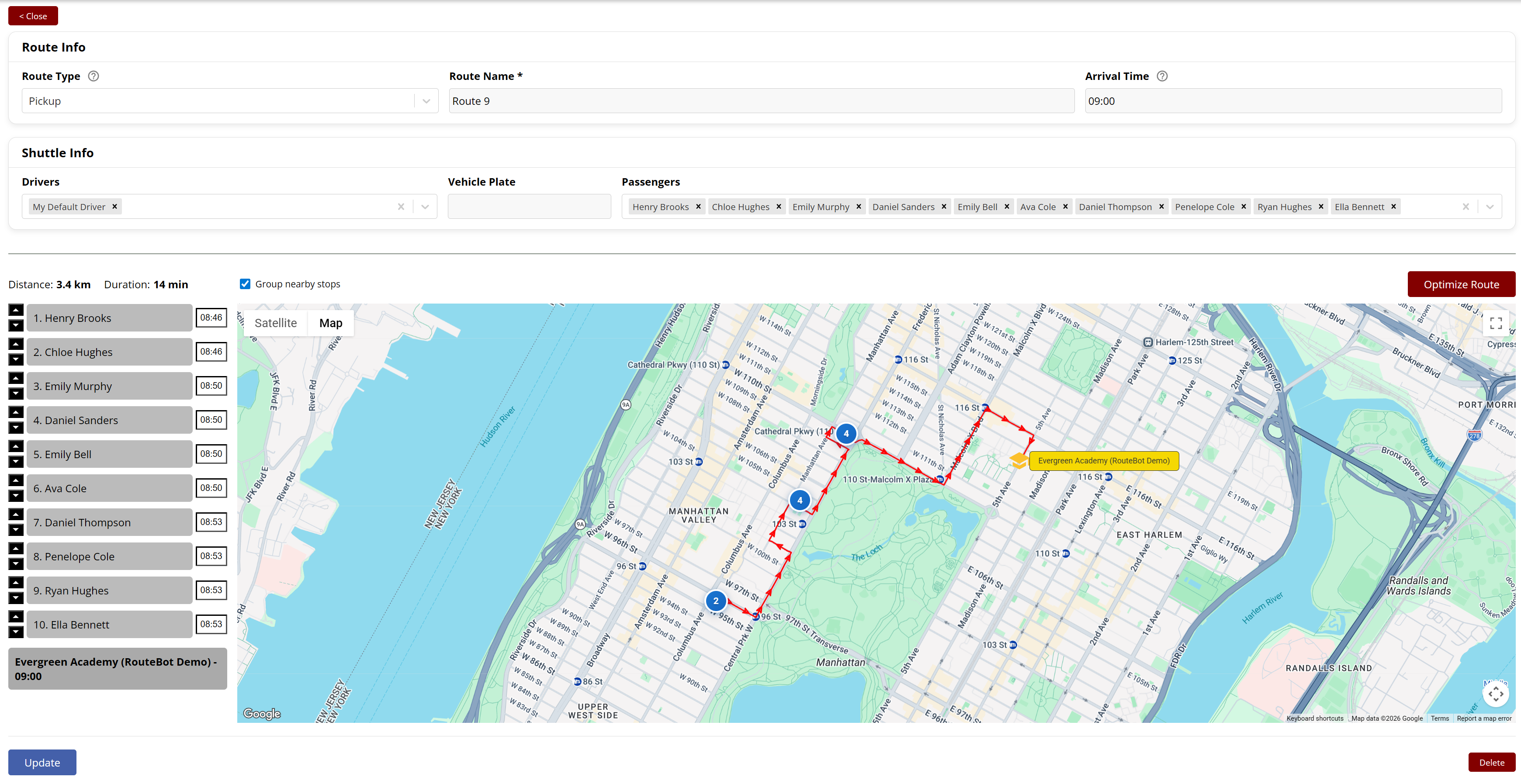
A completed route in RouteBot: Route 9 serves 10 students across Manhattan. Each stop has an assigned pickup time. Total distance: 3.4 km, duration: 14 min. Planners can drag stops, reassign students, or hit "Optimize Route" to re-sequence.
Route optimization in practice
Here's what the day-to-day actually looks like once you're set up:
1. Upload your roster. Drop an Excel file with student names, addresses, and school assignments. RouteBot geocodes the addresses and flags anything that doesn't resolve cleanly — wrong zip codes, suite numbers the geocoder can't parse, students mapped to empty lots.
2. Set your constraints. Maximum students per bus, bell times, walk distance limits, vehicle types. If you have SPED students who need lift buses or aide seating, that goes in as a hard constraint the optimizer will never violate.
3. Run the optimizer. The system distributes students across the minimum number of buses, sequences stops to minimize total distance, and calculates pickup times for every stop. This part takes minutes, not hours.
4. Review and adjust. Your planner reviews the proposed routes on a map, drags stops, reassigns students, locks specific assignments if needed. Then re-runs the optimizer around those fixed points.
5. Push to production. Drivers get routes on their mobile app. Parents get pickup details — vehicle, stop, estimated time. If a route changes mid-year, notifications update automatically.
The whole process from data upload to live routes can happen in a single day. The part that actually takes time isn't the software — it's verifying that your address data is accurate and your roster is current.
Want to run a sample optimization? Try it now — no signup, no sales pitch. Or see real routing results with a walkthrough using your own data.
When should you actually make the switch?
Not every district needs this. If you run eight buses on stable routes and nothing changes year to year, the ROI might not be there. But here are signals that the manual approach is costing you more than you think:
Your fleet keeps growing but enrollment isn't. Adding a bus every time something shifts is a sign that routes aren't being rebalanced. Routing software would reassign students across existing buses before recommending a new vehicle.
Mid-year changes are emergencies. A school closes, a subdivision opens, 30 families move — and your planner needs a week to sort it out. With routing software, the actual distribution and route generation takes minutes. In our system, distributing students to buses, pushing updated routes to drivers, and sending parents their child's new pickup time and vehicle assignment takes under 10 minutes total. The days you do spend aren't on optimization — they're on verifying that addresses are correct and that the roster is clean. We usually tell schools to budget about two days for data verification at the start of a term, not because the software is slow, but because bad addresses produce bad routes and it's worth catching them first.
You can't answer basic utilization questions. How many seats are empty on an average morning? What's your cost per student-mile? If nobody knows, you're probably paying more than you need to. Software gives you the data as a side effect of building routes.
Your planner is a single point of failure. One person holds all the route logic in her head. She goes on vacation and nobody can adjust a route. This is a staffing risk, not a software problem, but routing tools make the knowledge explicit and shareable.
The CFO is asking hard questions. "Why are 30% of our seats empty?" is a question that's hard to answer with "well, that's how it's always been done." Route optimization gives you a defensible, measurable answer.
What RouteBot does differently
We built RouteBot because the tools we saw in the market were either too academic (great algorithms, terrible UX), too basic (colored pins on a map, no real optimization), or too locked into a single use case (school-only, no corporate shuttle support).
Here's what we focused on:
Handles schools and corporate shuttles in one system. A lot of districts also run employee transportation or contract with companies that do. RouteBot doesn't force you to use two different products. Same engine, same interface, different configurations. If you run mixed fleets, the optimizer coordinates across vehicle types instead of treating each one separately.
Excel in, routes out. We know how districts store data: spreadsheets. RouteBot imports rosters directly from Excel files. No SIS integration required to get started (though we support it). Clean the data in the tool, not before.
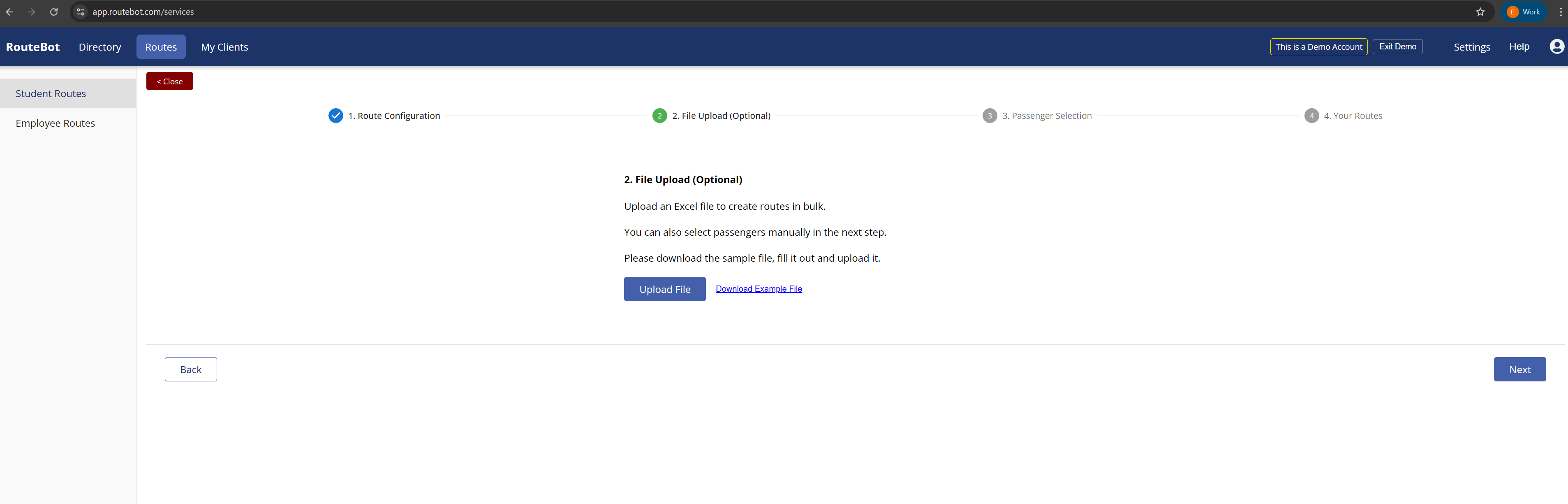
Step 2 of route creation: upload an Excel file with your roster, or select passengers manually in the next step. Download the sample file to see the expected format.
Planners stay in control. The optimizer proposes routes. Your team can override any assignment, lock specific students to specific buses, pin stops, and re-run around those constraints. It's a tool, not a black box.
Real-time tracking and parent notifications baked in. GPS tracking, ETA updates, pickup and dropoff notifications — these aren't add-ons. They're part of the same system. When a bus approaches a student's pickup point, the parent gets an automatic alert. When the bus arrives at school, another notification fires. When a student doesn't board, the system flags it and notifies the parent separately. All of this triggers from the GPS data the driver's app is already sending — there's no manual step. When a route changes mid-year, the notification rules update automatically because they're tied to the route assignment, not hardcoded. More on the notification architecture in school bus notification system.
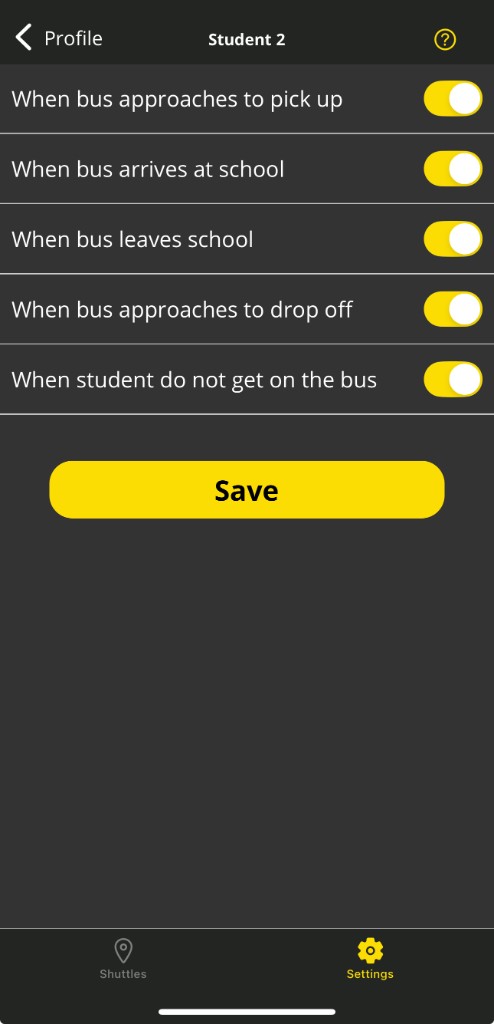
Parent notification settings in the RouteBot mobile app. Each event type can be toggled independently: bus approaching pickup, arrival at school, departure from school, approaching drop-off, and student not boarding.
Mobile app for drivers and parents. Drivers see their routes, student lists, and navigation in one app. Parents see where the bus is and when it's arriving. We wrote about the rollout process for the mobile side: school bus tracking app rollout.
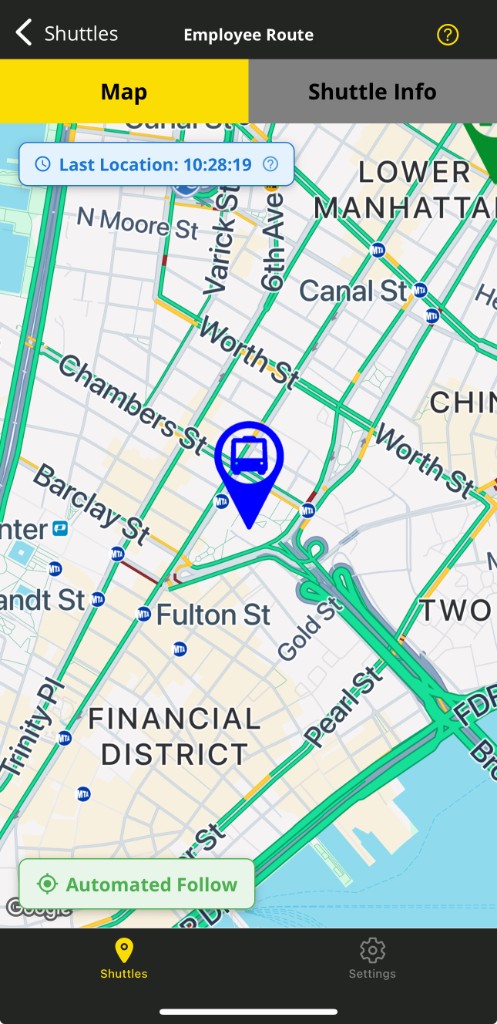
Live tracking in the RouteBot parent app. The bus icon updates in real time; "Automated Follow" keeps the map centered on the vehicle. Last location timestamp is visible at the top.
Scenario testing before you commit. "What if we close this school?" "What if we cut five buses?" "What if we cap routes at 18 students instead of 22?" Run it as a draft — the system generates proposed routes without touching anything live. Review the student assignments, check the distance totals per route, compare bus counts. If you like it, approve and push. If not, tweak the parameters and run again. Nobody touches a live route until you say so.
See how much you can reduce fleet size. Try RouteBot with sample data — run an optimization, compare bus counts, check the routes on a map. Or request a walkthrough and we'll run it with your roster.
The numbers districts care about
You don't adopt routing software because it's interesting. You adopt it because the math works.
Fewer buses. This is the biggest line item. If you're running 40 buses and optimization shows you can cover the same roster with 32, that's eight buses worth of driver salary, fuel, insurance, and maintenance you're not spending. Typical results range from 15–30% reduction, depending on baseline efficiency.
Less mileage. Shorter routes mean less fuel and less wear. Most districts see 10–20% reduction in total route miles. But watch for a trap: don't celebrate mileage savings if ride times quietly doubled. Balance matters.
Empty-seat miles drop. This is the metric most districts don't track but should. Every mile a bus drives with unused seats is money burned. Optimization directly attacks this by spreading students more evenly. We have a full guide on measuring and reducing it: empty seat miles.
Planning time collapses. This one surprised us too. At one school with around 500 students, the operations manager told us annual route planning used to take her close to three weeks — comparing lists, drawing routes, calling drivers, arguing about who covers which neighborhood. After the first year on RouteBot, the distribution itself ran in minutes. The total setup, including address verification, parent notifications, and driver assignments, took under two days. Her time shifted from building routes to reviewing and improving them, which is what she should have been doing all along.
What about SPED, wheelchairs, and specialized routing?
This is where a lot of products fall short, and it's worth addressing separately.
Special education routing isn't just regular routing with a wheelchair icon. Vehicles have different equipment: wheelchair securements, lift gates, aide seating. Some students can't share a vehicle with certain other students. Ride time limits may be stricter. Routes sometimes need to be direct, with no multi-stop detours.
If the software treats every bus as a box of identical seats, you'll fight it all year on SPED routes and end up doing those by hand anyway. RouteBot models vehicle types with differentiated capacities — general seats, wheelchair positions, aide seats — and the optimizer respects those as hard constraints. A student who needs a lift bus won't be assigned to one that doesn't have it.
This also connects to driver shift scheduling, because SPED routes often run on different schedules and need drivers with specific certifications.
Common hesitations (and honest answers)
"Our planner knows things software can't." True. And she should keep knowing them. Software produces an optimized draft; your planner brings the local knowledge that no dataset captures. The railroad crossing, the school entrance without a pull-off, the family that moved but didn't update their address. These are the patches she applies after the optimizer runs. That's faster and better than building everything from scratch.
"Our data is a mess." Also probably true. But it has to get cleaned eventually. We built a pre-flight check into RouteBot's onboarding flow for exactly this reason: before optimization runs, the system flags every student whose address didn't geocode properly, whose location is missing, whose parent record is incomplete, or whose contract isn't linked. It exports a report with every problem row — "student X has no map pin," "student Y has no parent notification link" — so you fix it in one pass instead of discovering issues one bus at a time in September. At one school, this pre-check caught 40 students mapped to a gas station because the address field had a suite number the geocoder couldn't parse. Two hours of cleanup saved a semester of wrong stops.
"We tried a routing product and it didn't work." Fair. Some products in this space are genuinely bad — pretty map interfaces with a basic nearest-neighbor algorithm behind them. Others are powerful but have terrible UX, so the planner gave up after two days. We've tried to address both: real optimization under the hood, and an interface that doesn't require a training course to use.
"We don't have the bandwidth to migrate all this data into a new system." You don't have to. We handle onboarding end to end — what some people call a "done for you" setup. Send us whatever you have: Excel rosters, PDF lists, a folder of CSVs someone exported three years ago. You don't need to reformat anything or learn our import templates. Our team takes your raw data, cleans it, loads it into RouteBot, verifies addresses, and hands you back a working system with routes ready to review. The first time you log in, your students are already there, your vehicles are set up, and the optimizer is ready to run. We've done this enough times that the messy spreadsheet with merged cells and Turkish characters in the headers doesn't faze us anymore.
"The operations staff are used to Excel." This one we've lived through. At one transportation company we onboarded, the staff responsible for managing school routes had been using spreadsheets for years. The initial reaction was exactly what you'd expect: "I know my Excel, why do I need this?" They weren't wrong to be skeptical — switching tools costs time upfront. But once the first batch of routes went out and they saw that what used to take days was now handled in minutes, the tone shifted. Within a few weeks, the person managing one school's routes started showing the system to colleagues responsible for other schools. It became internal word-of-mouth. Now they tell us they can't imagine going back to spreadsheets. The shift wasn't about forcing a tool change — it was about the work getting visibly easier, and people noticing on their own.
Where to start
You don't need to commit to a full rollout to see if this works for your district. Try the live demo with sample data — add students, set constraints, run the optimizer, and see what comes out. No signup required.
If you want a walkthrough with your own data, you can request a call and we'll run it together.
For the technical details on how routing algorithms work under the hood — VRP frameworks, constraint modeling, heuristic methods — see our companion piece: Technical Analysis of School Bus Routing Software.
Frequently Asked Questions
What is school bus routing software?
It's software that takes your student roster, your buses, and your rules — bell times, capacity limits, stop policies, vehicle types — and figures out the best set of routes automatically. Instead of your planner eyeballing assignments on a map, the system searches through thousands of combinations and finds plans that use fewer buses and cover less distance. Your planner still reviews everything and makes adjustments. The software just handles the math that no person can do at scale.
How does routing optimization work?
The short version: the software groups students into clusters that fit on a single bus, assigns those clusters to vehicles, and sequences the stops so each route is as short as possible. It won't break your hard rules — if a bus holds 45, it won't assign 46. If school starts at 8:00, it won't schedule a pickup at 8:15. The solver tries thousands of arrangements and keeps improving until it runs out of time or can't find anything better. For the full technical picture — VRP frameworks, constraint modeling, heuristic methods — see our technical analysis of school bus routing software.
Can software actually reduce the number of buses?
Yes. It's the most concrete result most districts see. The typical range is 15–30% fewer buses, though it depends on how loose things were before. Manual routes pick up slack over years — a bus added here, a route that was never rebalanced there — and optimization strips that out by reassigning students across the fleet. Whether you save 2 buses or 12, the mechanism is the same: the software finds combinations your team didn't have time to try.
How long does route planning take with software?
The optimization part — distributing students to buses and sequencing stops — takes minutes, even with 500+ students. The part that eats real time is data cleanup: verifying addresses, catching the kid who moved but didn't update the school, confirming bell times. Budget about two days for that at the start of a term. After initial setup, mid-year changes (new enrollments, address updates, school transfers) take minutes: update the data, re-run, push routes to drivers and parents.
Related reading
- Manual vs Algorithmic Route Planning
- Mixed Fleet Route Optimization
- Dwell Time Optimization
- Empty Seat Miles: Practical Guide
- Driver Shift Scheduling
Written by Emrah G., founder of RouteBot. Follow on Twitter/X.